

Getting Started with Pytest

In the previous article I wrote about Linting with Travis in Python, we introduced pytest for checking lints, but question what is Pytest? Pytest is a testing framework just like the in-built unittest which allows us to write test codes using python.
Why We're Here
Pytest doesn't force you to abandon the Python way of writing code, unlike python's inbuilt test module that forces you to follow the Java culture. This is because it is based on Erich Gamma's JUnit and Kent Beck's Smalltalk testing framework. We're here to embrace a new way of life in test-driven developments.
Getting Started with pytest
Pytest is a command-line tool that discovers Python tests and executes them. It's easy to get started with. Follow these steps to continue:
- Create a virtual environment using
python3 -m venv testingand activate it(Linux and Windows use different methods to activate the venv). - Ensure you have pytest installed, use
pip install pytestif you haven't done so already. - Ensure pytest is available in the command line using
pytest -h - Create a file called test_basic.py, and add the following functions in it:
    def test_dev():
        stdout = "DEV Community"
        assert stdout == "DEV Community"

    def test_exponent():
        exponent = 3**3
        assert exponent == 9
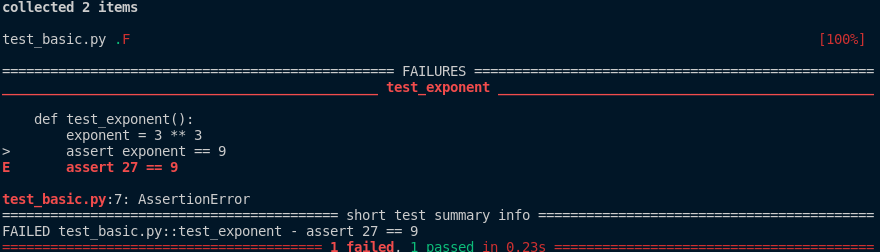
Now on your terminal, run your test using pytest test_basic.py
You should see a result like below:
Output
If you have the output above, congratulations, you have successfully run your first test with Pytest, it's that easy. You can see how many tests passed and how many failed and also the line throwing the error.
Also, the test_basic.py .F [100%]. When a test runs successfully, It uses the period(full stop) to show that it didn't fail, but when it fails, it uses the F to show failure. This list shows you the outputs from a Pytest build:
- . - test passed
- F - test failed
- E - Exception
- s - test skipped
- x - expected failure (broken now but will fix)
- X - unexpected pass (should have failed)
Layouts And Conventions
When testing with Pytest, there are few conventions you should follow:
- The testing directory needs to be named tests.
- Test files need to be prefixed or suffixed with test; for example, test_basic.py or basic_test.py
- Test functions need to be prefixed with
test_; for exampletest_hello. If it is namedtesthello.py, Pytest won't see it. - Test classes need to be prefixed with Test; for example
TestCase. - If test subdirectories don't have
__init__.py, you can't use the same filename in different directories.
So the most basic structure of a project to be tested is as seen below;
Project
\---proj
    |   proj_file.py
    |   __init__.py
    |
    \---test
            test_proj_file.py
Differences with unittest
Python has an inbuilt utility for testing called unittest module. Here are some of the differences.
Code Difference
import unittest

class TestExponent(unittest.TestCase):
    def test_exponent(self):
        exponent = 3**3
        self.assertEquals(exponent, 9)


class TestDev(unittest.TestCase):
    def test_dev(self):
        stdout = "DEV Community"
        self.assertIs(stdout, "DEV Community")
In another directory, create a new python file called test_basic and copy and paste the above code into it. Then run it with python -m unittest.
Pythonic Culture
Like we earlier said, the unittest uses a Java coding culture. What this means is unittest forces the use of classes and class inheritance. Python standardly isn't a strong OOP language so beginners and even intermediates may have a hard time using the unittest module. The unittest module focuses on OOP making testing an obstacle to newbies. For experienced developers, OOP isn't a problem but using classes and inheritance to write a simple test is absurd! Pytest follows Python's culture in making things simple(check out the Zen of Python: import this in the python shell will show more.)
Multiple Assertions
Once you inherit from TestCase, you are required to understand(and remember) most of the assertion methods used to test results. In our code difference session, we see we used two different asserts compared to the single assert we used in our actual code. Some asserts can be found here
Comparison Engine
pytest provides a rich comparison engine on failures when compared to unittest. It's more like a verbose but pytest even has a verbose flag to see more of what your code is doing. That's some cool stuff if you ask me. Lol, for definition sake, verbose is: ...
Extendability
Pytest is extendable, it's not limited like unittest. This means you can use pytest past its basic uses. You can alter its engine.
Summary of the differences
- unittest is Non-PEP 8 compliant(Python's own culture)
- unittest is "Classy" - Matt Harrison
- So many assert methods to remember
Some Points To Note About Assert
How assert Works
So far, we can say the pytest replaces the Java way with the Python way and also replaces over .. assert statements to just one assert. Pytest uses an import hook (PEP 302) to rewrite assert statements by introspecting code(AST) runner has collected.
Careful Handling
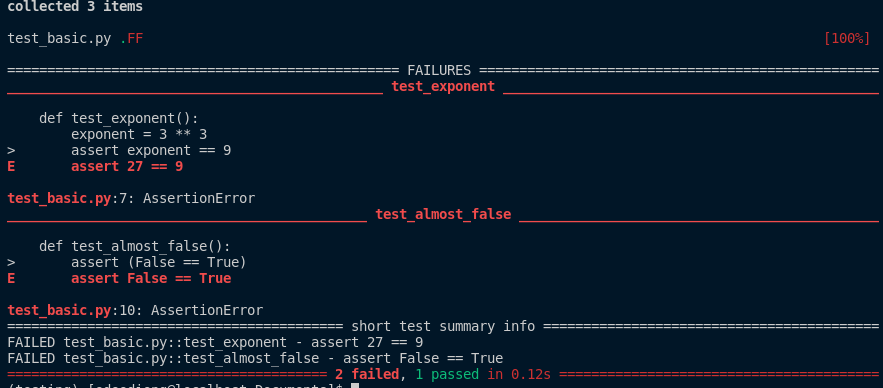
Don't wrap assertion in parentheses. Parentheses are by default a truthy tuple. Add the code below to our test_basic.py:
def test_almost_false():
    assert (False == True)
You will get a warning like the one in the picture below.
Ability to specify a message
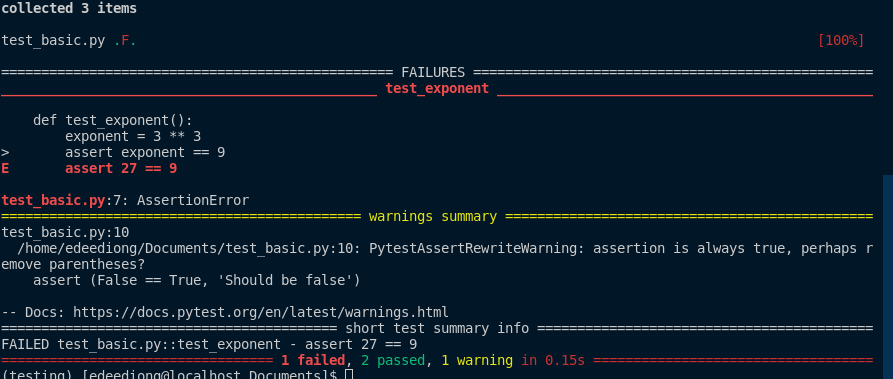
You can specify a message in assert statements. Note for test_almost_false function, once you specify a message, it changes from a failed test to pass with a warning. This isn't efficient and in subsequent articles, we will explain how to handle this expected failure. Reediting the test_basic.py file:
def test_dev():
    """Checks if Hello World is the result."""
    stdout = "DEV Community"
    assert stdout == "DEV Community"

def test_exponent():
    """Checks if the exponential is equal 9."""
    exponent = 3 ** 3
    assert exponent == 9, "Value should be 9"

def test_almost_false():
    assert (False == True, 'Should be false')
We should have a result like the image below:
In the next part of our testing journey, we will talk about the extensibility of pytest: debugging, test selection, and marking and fixtures.
Comments
Join the discussionNo comments yet. Be the first to comment.


